How to Convert Lecture Notes to LaTeX
August 15, 2025
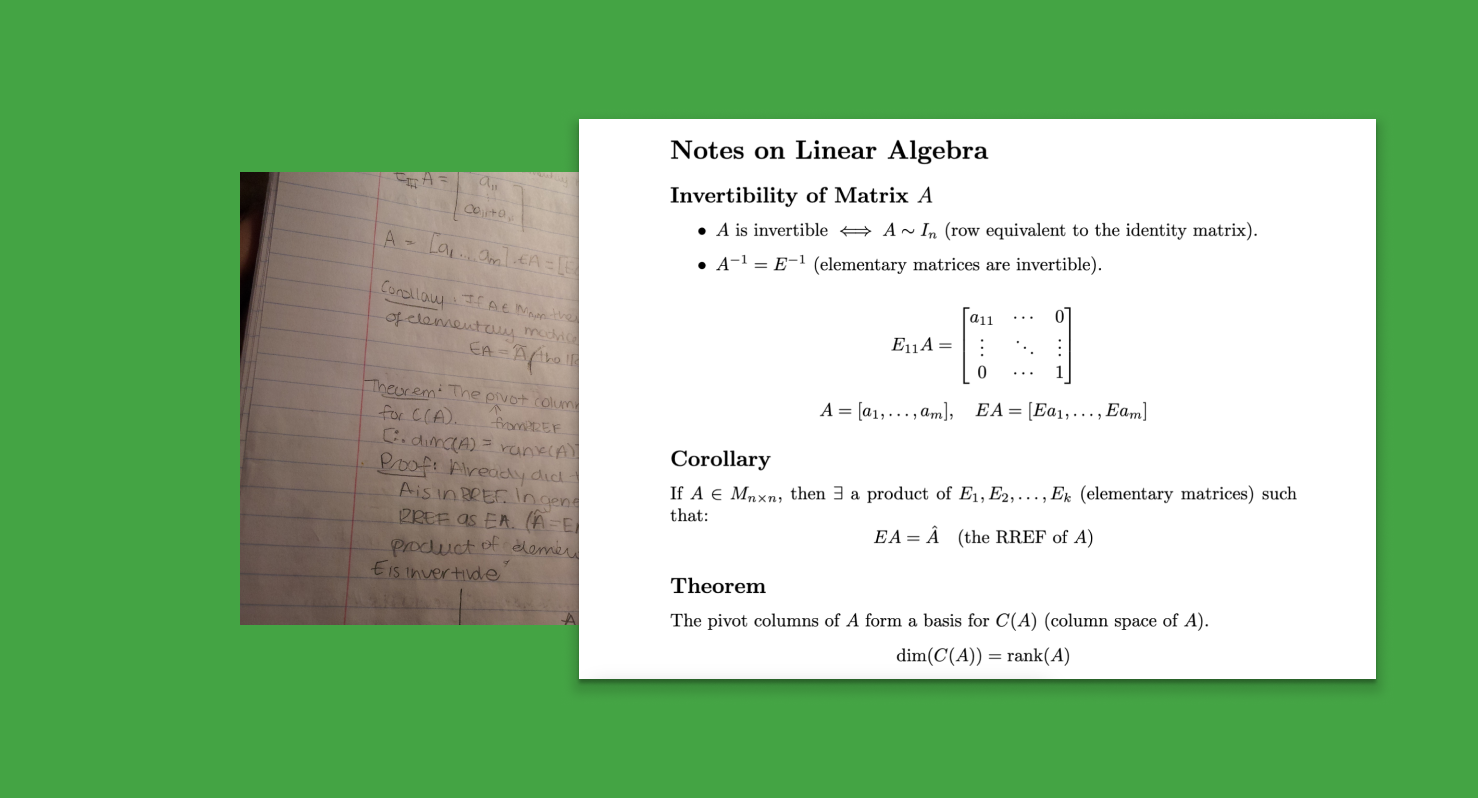
Converting lecture notes to LaTeX is essential for creating professional academic documents, study materials, and research papers. Whether you have handwritten notes, digital annotations, or typed content, this comprehensive guide covers all the methods and tools to transform your notes into beautifully formatted LaTeX documents.
Why Convert Lecture Notes to LaTeX?
- Create professional study materials and course summaries
- Share notes with classmates in a standardized format
- Build a searchable digital library of your academic content
- Integrate notes seamlessly into research papers and theses
- Ensure mathematical equations are properly formatted
- Preserve and organize knowledge for future reference
Types of Lecture Notes and Conversion Methods
1. Handwritten Notes
Handwritten lecture notes are the most common format but also the most challenging to convert. Modern AI tools have revolutionized this process:
Best Method: Underleaf’s Image to LaTeX Converter
- Take clear photos of your handwritten notes
- Upload to Underleaf’s AI-powered converter
- Get clean LaTeX code with proper equation formatting
- Edit and refine the output as needed
2. Digital Notes and PDFs
Digital notes from tablets, laptops, or PDF annotations can be converted using various methods:
- PDF to LaTeX conversion: Use Underleaf’s PDF converter for documents with complex formatting
- Copy and paste: For plain text content, copy into LaTeX editor and add formatting
- Screenshot conversion: Take screenshots of digital notes and use image-to-LaTeX tools
- Transcribe audio using tools like Otter.ai or Whisper
- Clean up transcription and organize into logical sections
- Add LaTeX formatting for mathematical content manually
- Use Underleaf’s AI assistant to help structure the content
- Prepare your notes: Ensure handwriting is clear and pages are well-lit
- Take high-quality photos: Use good lighting and avoid shadows or reflections
- Upload to Underleaf: Drag and drop images into the converter
- Review AI output: Check the generated LaTeX code for accuracy
- Edit and refine: Make necessary corrections and improvements
- Keep editing: Continue in your preferred LaTeX environment
Method 2: Manual Conversion Process
- Create document structure: Set up sections, subsections, and logical organization
- Convert text content: Type out main content with proper LaTeX formatting
- Handle mathematical equations: Use LaTeX math environments for formulas
- Add diagrams and figures: Include images or create TikZ diagrams
- Format tables and lists: Use appropriate LaTeX environments
Handling Different Content Types
Mathematical Equations
Mathematical content is often the most complex part of lecture notes. Here’s how to handle it effectively:
Diagrams and Figures
Convert diagrams from your notes using these approaches:
- Scan and include: High-quality scans as image files
- Recreate with TikZ: For geometric or technical diagrams
- Use drawing tools: Create digital versions with drawing software
- Reference external figures: Link to online resources when appropriate
Tables and Data
Convert tabular data from your notes:
Organizing and Structuring Your LaTeX Document
Document Structure for Lecture Notes
Best Practices for Note Organization
- Use consistent formatting: Establish styles for headings, definitions, and examples
- Create a template: Develop a standard structure for all lecture notes
- Add cross-references: Link related concepts across different lectures
- Include metadata: Date, lecturer, course information
- Use packages: Load appropriate packages for your field (physics, chemistry, etc.)
Advanced Tips and Techniques
Automation and Batch Processing
- Process multiple pages simultaneously with Underleaf’s batch upload
- Create templates for different types of lectures (math, science, humanities)
- Use consistent naming conventions for easy organization
- Set up automated compilation with an online editor or local LaTeX distributions
Quality Control and Review
- Always proofread AI-generated LaTeX code for accuracy
- Compare output with original notes to ensure nothing is missed
- Test compilation to catch any syntax errors
- Share with study groups for collaborative improvement
Tools and Resources Comparison
Recommended Tools for Note Conversion:
- Underleaf (Best Overall): AI-powered image and PDF conversion with high accuracy
- Mathpix: Good for equation-heavy content, subscription required
- Adobe Acrobat: OCR for digital PDFs, limited LaTeX export
- Manual typing: Most time-consuming but gives full control
Common Challenges and Solutions
Poor Handwriting Recognition
- Solution: Take multiple photos with different lighting and angles
- Tip: Write more clearly during lectures if you plan to convert later
- Alternative: Combine with audio recordings for context
Complex Diagrams and Figures
- Scan at high resolution (300+ DPI) for best quality
- Consider recreating complex diagrams digitally for better clarity
- Use vector graphics when possible for scalability
Time Management
- Convert notes shortly after lectures while content is fresh
- Use AI tools to speed up the initial conversion process
- Focus on accuracy over perfection in the first pass
- Build conversion into your regular study routine
Conclusion
Converting lecture notes to LaTeX transforms your academic workflow, creating professional documents while preserving valuable knowledge. Whether you choose AI-powered tools like Underleaf for instant conversion or prefer manual methods for full control, the key is establishing a consistent process that works for your learning style. Start with your most important courses and gradually build a digital library of beautifully formatted academic content.

Practical tools for academic writing, document conversion, and research workflows.
Go to appContact usAsk AI about Underleaf
© 2026 Underleaf. All rights reserved.