PDF to LaTeX Conversion Problems: OCR, Equations & Tables
August 28, 2025
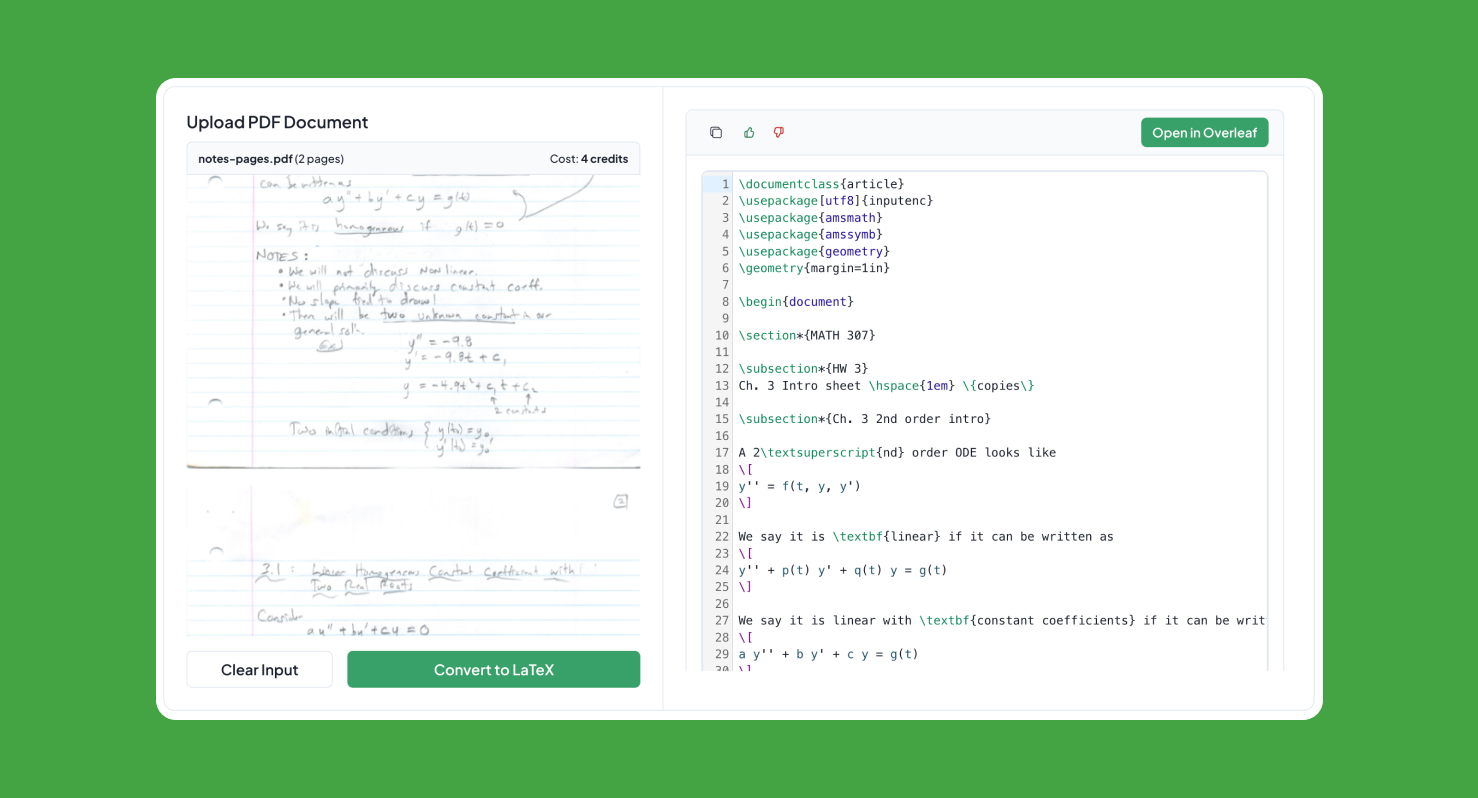
Converting PDF documents to LaTeX format is essential for academic researchers, students, and professionals who need to edit existing papers, extract mathematical content, or recreate documents in LaTeX. This troubleshooting guide explains why PDF-to-LaTeX conversions fail and which recovery method fits scanned pages, equations, tables, multi-column layouts, and editable academic documents.
Common PDF to LaTeX conversion problems
- Edit existing academic papers and research documents
- Extract mathematical equations from textbooks and papers
- Recreate documents with proper LaTeX formatting
- Collaborate on documents that were originally in PDF format
- Maintain version control and track changes
- Ensure consistent formatting across multiple documents
Choose the right PDF-to-LaTeX recovery method
1. Underleaf PDF to LaTeX Converter (Recommended)
Underleaf’s AI-powered converter is specifically designed for academic documents and offers:
- Advanced Math Recognition: Accurately converts complex equations, matrices, and symbols
- Table Extraction: Preserves table structure and formatting
- Bibliography Processing: Maintains citations and references
- Figure Recognition: Identifies and preserves image placements
- Instant Export: Download a ready-to-edit .tex file or open it in the Underleaf editor
2. Mathpix Snip
Good for converting screenshots and small sections of PDFs, particularly mathematical equations:
- Excellent equation recognition
- Mobile app available
- Limited to screenshots and small sections
- Subscription required for extended use
3. Pandoc
Command-line tool for document conversion:
- Free and open source
- Requires technical knowledge
- Limited equation recognition
- Good for text-heavy documents
Step-by-Step Conversion Process
Using Underleaf (Recommended Method)
- Upload your PDF: Simply drag and drop your PDF file onto the Underleaf converter
- AI Processing: The AI analyzes your document structure, equations, and formatting
- Review Results: Check the generated LaTeX code and make any necessary adjustments
- Keep editing: Continue refining the result in the Underleaf editor
- Download LaTeX: Get the complete LaTeX source code for your document
Handling Complex Elements
Mathematical Equations
Modern PDF to LaTeX converters use AI to recognize mathematical notation:
- Inline equations are converted to
\(...\)format - Display equations become
\[...\]or equation environments - Complex symbols and operators are accurately recognized
- Matrix and vector notation is preserved
Tables and Figures
- Tables are converted to tabular environments
- Figure captions and labels are preserved
- Cross-references are maintained when possible
- Complex table formatting may require manual adjustment
Bibliography and Citations
- Reference lists are converted to bibliography format
- In-text citations become
\cite{}commands - BibTeX entries are generated when possible
- DOI and URL links are preserved
Best Practices for PDF to LaTeX Conversion
- Source Quality: Use high-resolution PDFs with clear text and equations
- Pre-processing: Remove unnecessary pages or sections before conversion
- Review Output: Always check the converted LaTeX for accuracy
- Manual Refinement: Expect to make some manual adjustments for complex formatting
- Test Compilation: Compile the LaTeX to ensure everything works correctly
Common Challenges and Solutions
Scanned Documents
For scanned PDFs or image-based documents:
- Use OCR preprocessing to convert images to text
- Consider using Underleaf’s Image to LaTeX tool for equation-heavy pages
- Manual verification is often required
Complex Formatting
- Multi-column layouts may require restructuring
- Custom formatting might not convert perfectly
- Special fonts and styling may need manual recreation
Conclusion
Converting PDF to LaTeX opens up new possibilities for document editing, collaboration, and academic publishing. While automated tools have greatly improved, choosing the right converter for your specific needs is crucial. For academic documents with complex mathematical content, AI-powered solutions like Underleaf offer the best combination of accuracy and ease of use.

Practical tools for academic writing, document conversion, and research workflows.
Go to appContact usAsk AI about Underleaf
© 2026 Underleaf. All rights reserved.