
Extension installed · You're all set
Welcome to Underleaf.
Publication-ready LaTeX from a side panel that works on any site. Three things to try first:
Or click the Underleaf icon in your browser toolbar anytime.
01
Snip anything into LaTeX
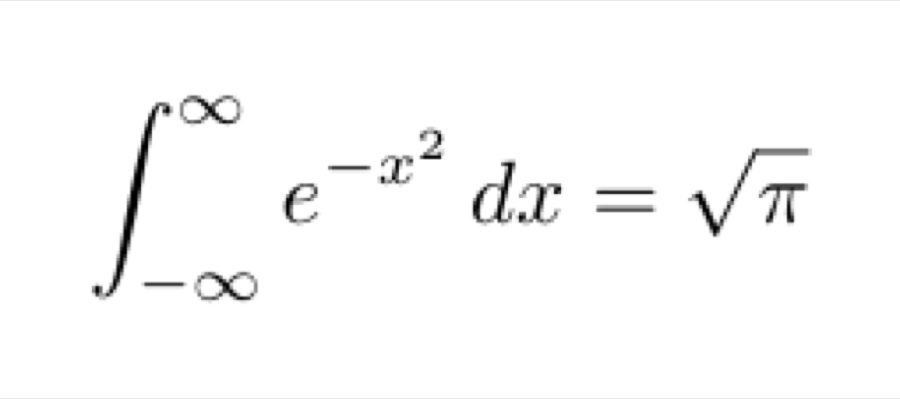
Open the side panel, hit “Snip it off the page”, and drag over any equation, table, or paragraph. Or skip the drag entirely: right-click any image and choose “Convert image to LaTeX”. Try either on this one, right here:
02
Preview, then copy as an image
Every result compiles on a real LaTeX engine, right in the panel. When you just need the typeset output in a doc or a slide, copy it as a PNG.
Read the guide →03
Right-click from anywhere
Right-click selected text to edit it with AI or convert it to LaTeX. Even better: right-click any equation image on the web and hit “Convert image to LaTeX”.
Open the web app ↗Shown running on overleaf.com. Underleaf is not an authorized partner of Overleaf® nor otherwise endorsed, associated or connected with Overleaf®.
Upgrade · Extension exclusive
Unlimited, wherever you write.
The free plan includes 5 generations a day in the extension. Upgrading removes the limit everywhere you use Underleaf and raises your credits on the web app.
Unlimited generations in the extension
500 credits/month on the web app
Convert up to 20 pages per PDF
Access to all LaTeX tools
Priority support
For extension users
30% off any plan.
EXTENSION30
Use at checkout · Essentials or Pro
Cancel anytime.