Teaching & Faculty
Teaching & Faculty
Free body diagram maker
Set up a block on an incline. Choose the forces and labels you want to explain, then download a figure for a problem set, lecture slide or LaTeX document.
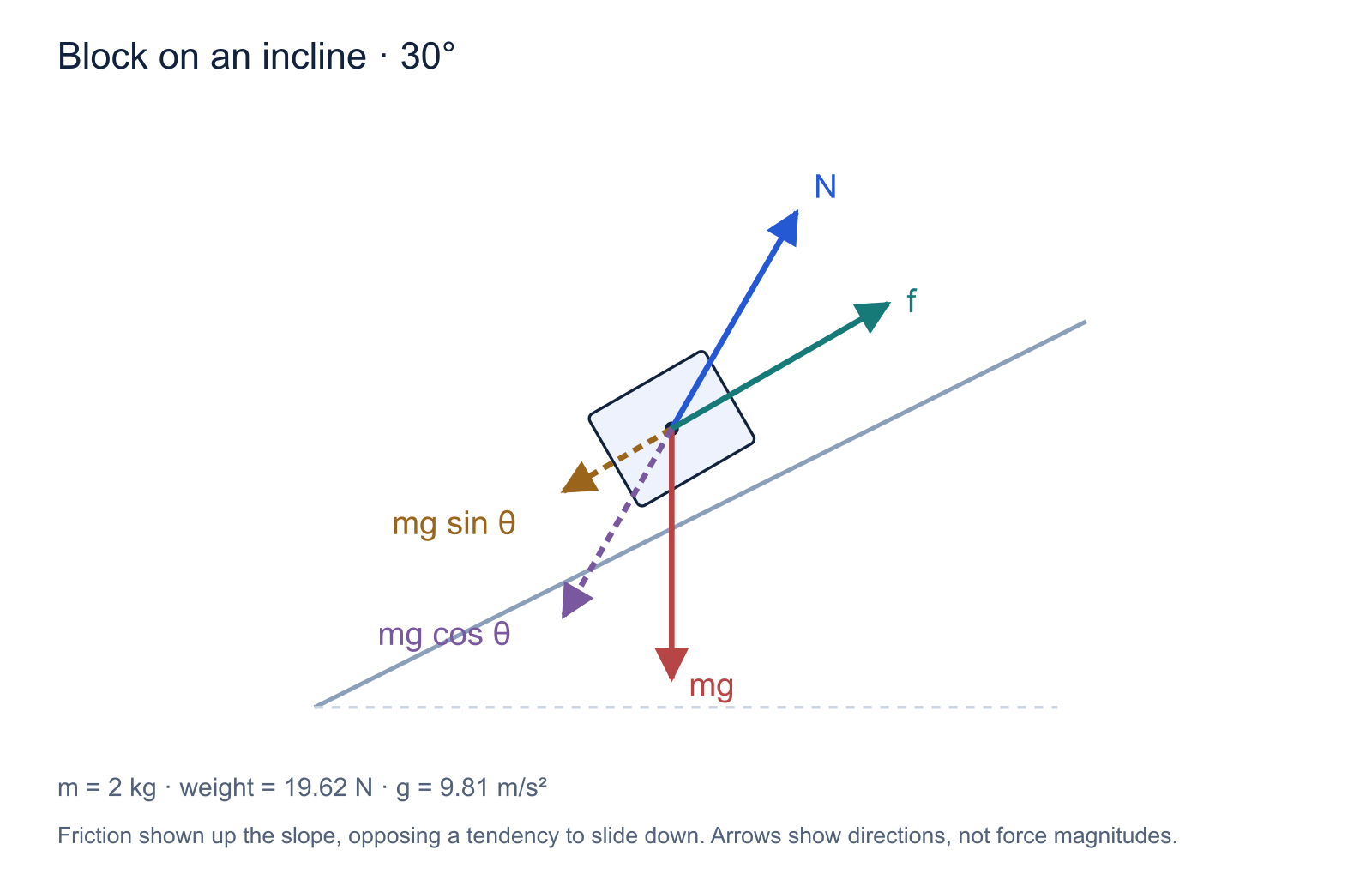
Arrows show direction, not relative force magnitude. Friction is drawn up the incline, assuming motion or a tendency to move down it.
The builder is free. “Customize with AI” opens a vector starter in Figure Maker with your settings in the prompt, ready for you to send.
How to draw a free body diagram
- Choose one object. Here the system is the block. Draw the forces acting on that block, rather than forces the block exerts on its surroundings.
- Add weight. The gravitational force is mg and points vertically downward. Tilting the incline does not tilt gravity.
- Add the normal force. It points perpendicular to the contact surface, away from that surface.
- Decide whether friction belongs in the model. Friction opposes relative sliding or its tendency at the contact. In the pictured case it points up the incline.
- Choose axes if you need equations. Resolving weight parallel and perpendicular to the plane often makes the equations simpler.
Forces versus components
The dashed arrows mg sin θ and mg cos θ are components of the same weight vector. They are not two additional forces to add alongside mg in a force sum. Use either the vector or its resolved components in a calculation.
For this simple incline with no other perpendicular forces and no acceleration into or away from the plane, N = mg cos θ. Along the plane, the component of weight is mg sin θ down the slope. Adding an applied force or changing the physical setup can change the equations.
This tool draws a chosen model; it does not solve for an unknown coefficient of friction or determine whether the block is moving. Check the assumptions in your question before using the friction arrow.
Make a diagram that works in a lecture or paper
Use SVG when you want scalable arrows and editable text in a compatible vector editor. Use PNG for a quick insertion into slides. The TikZ download contains a standalone LaTeX example so you can change notation, colors and placement in source.
For a teaching sequence, export one version with just weight and the normal force. Then add the component vectors on the next slide. Keeping the object in the same position makes the new information easier to follow.
Common questions
Further reading: OpenStax: Drawing free-body diagrams.
Try it free
A different setup? Start with this one.
Open the vector starter and describe the system, forces and labels you need. Review the result before using it in your explanation.
Starter examples are free to open. AI generation and edits use credits.